ZapaPOS is a project I’ve been working on since October 2025, and as of April 2026, it entered to the production stage. It’s one of the most complex projects, yet fascinating, I have built.
In this blog post, I want to share the process of creating this point of sale software and the challenges that arose; choosing the right software stack, the complexity of integrating an specific user workflow, testing every possible scenario to ensure the maximum reliability, among others.
This is a series of blog posts, being this the first one, that talks about the iterations of ZapaPOS, from its conception to its production-ready app.
If you’re curious about the app’s functionalities, don’t you worry. You can check it out right here:
Working with the right stack
The hardest decisions happen at the beginning of creating a product. When you’re laying out the foundations, just like building a house, you have to make sure you’re choosing the right resources, strong, durable building materials, that can withstand the test of time, and those that require the less maintenance in the long run (you won’t be re-building your home every two years, right?). However, my approach to software making has always been one of trial and error, so to build ZapaPOS I had to go through an iterative process to settle down with a tech stack I felt “at home”, and thanks to spec-driven development, aided by LLMs, experimenting to build a web platform takes very little time.
Polishing the Ruby
The first iteration of ZapaPOS was made using Ruby on Rails. Development with this full-stack framework felt almost like magic: you just align to the Ruby on Rails Doctrine and you surely will be on track to build a solid platform. It was pretty much comprised of RoR + PostgreSQL, that’s it. The frontend didn’t use a fancy Javascript-based framework, just embedded Ruby templates, SCSS and ViewComponent, for maximum compatibility the Ruby ecosystem. This is what it looked like:
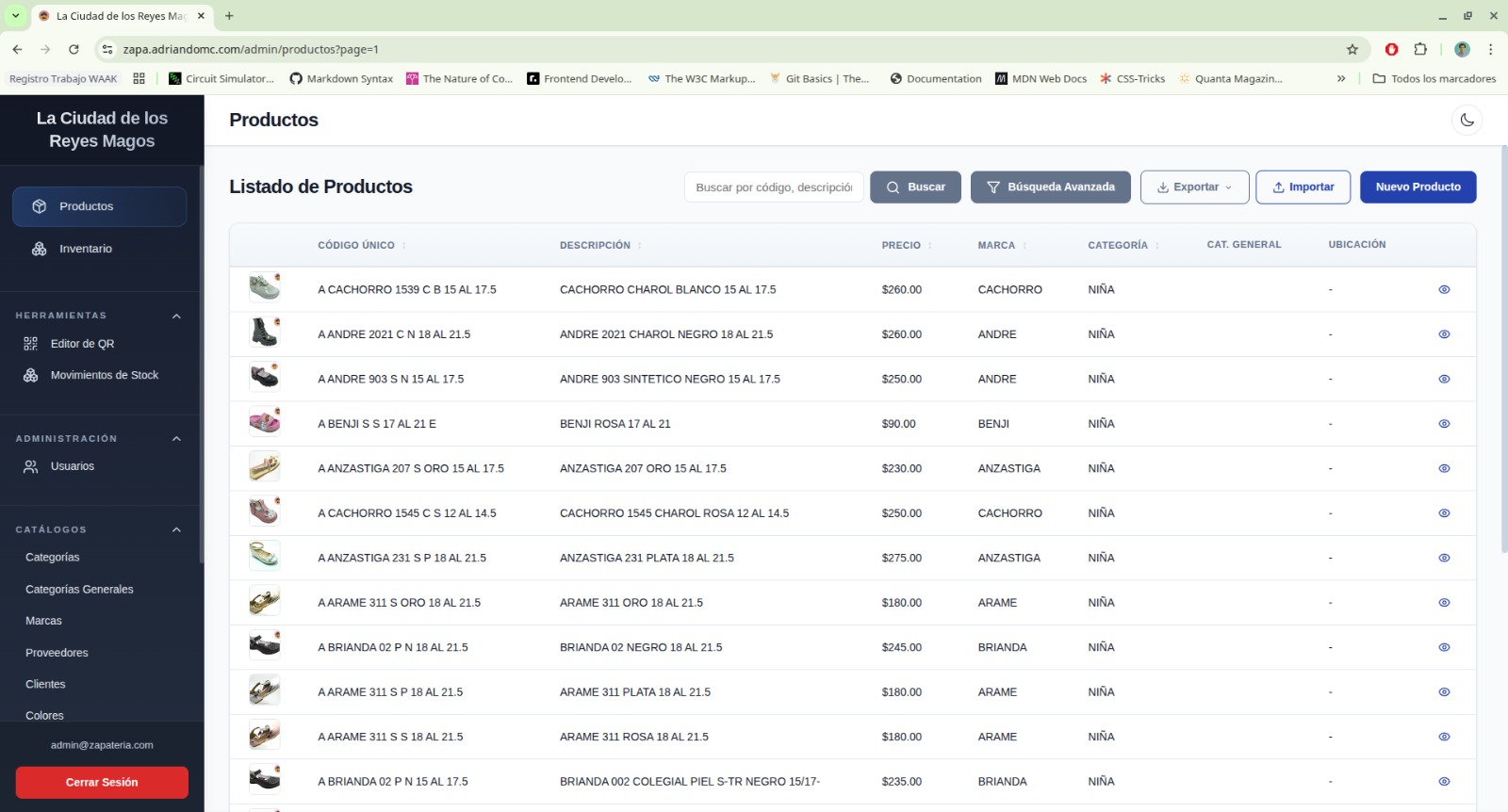
First iteration of ZapaPOS, made with Ruby on Rails
As you can see, it had a very generic look-and-feel, with a sidebar-based navigation and sporting a Bootstrap-esque UI. The customer liked the look, but I knew it could improve (more on this later…).
I wasn’t so sure that this was the best approach, considering it is intended to be used to sell products. To me, it felt as if I was browsing through a store catalog, not a retail inventory. So I thought over this design for many nights, wondering how it could be improved, how the UI could invite the user to tinker with it. The full-page navigation wasn’t as proactive as I wanted this system to be, and I lost the count of how many times the Turbo frames broke when rendering partials, because I insisted it had to silently reload the website without triggering a full-page reload. It was a mess. It worked, but still was hideous.
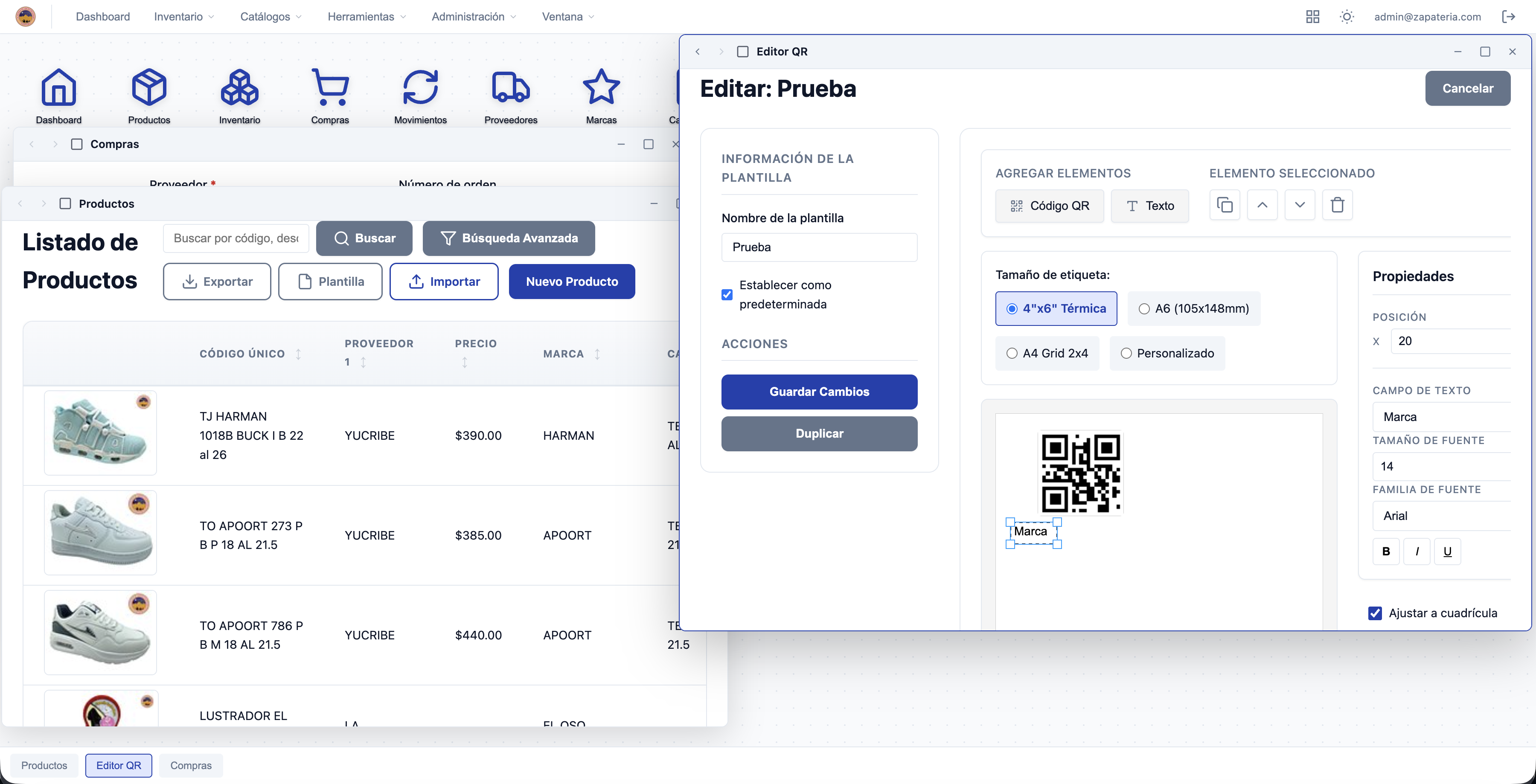
Window-based navigation on Ruby on Rails Hotwire and Turbo
Then the desktop-like navigation came to solve some issues (now there was real-time updating) but introduced some other (heavy RAM usage, incomplete tables loading, items list weird updating, a long etcetera). The draggable windows made it look like a desktop application, without being one, and made the customer happy, because their existing POS (a very legacy one, as they had to work with Windows 7) allowed to open multiple windows to work on different stuff at the same time.
At the top of the desk
After dealing with multiple issues from the first MVP, I knew I had to work around it. The easiest choice was to stop building a web platform altogether and concentrate on making it desktop-first (not desktop-native), so the window navigation was more native oriented. Just as a disclaimer, at that moment I wasn’t aware of Hotwire Native, which would have made a transition from the first iteration a bit more desirable.
Now, with Ruby on Rails ditched and out of the way, again a decision was to be made. What amazing monolithic framework I would choose this time to re-create ZapaPOS? Well… this time I wasn’t intending to base my decisions in a single framework, but rather looking for a solid tech stack that would redefine this POS as a real-time, local-first, multi-platform solution. With this in mind, and guided by the results of a solid research phase, I chose to continue this journey with Tauri + Svelte + SQLite + ElectricSQL + PostgreSQL + Hono. Phew, what a mouthful! Yeah, there may be some redundancy by the SQL engines, as each one has a defined purpose (SQLite on desktop and mobile, ElectricSQL self-hosted as server sync and PostgreSQL for the cloud DB).
As you can expect, this decision came with a lot of unexpected issues, as I (the LLM, mostly) had to deal with translating the SQLite queries into PostgreSQL, and sync them via ElectricSQL, this caused a lot of race conditions for simple actions such as updating multiple products in a batch operation. This iteration, being local-first, had to deal with reconciling sales tickets issued by multiple cashiers, and again, more issues were introduced rather than solved.
How it looked like? Well, a lot better than the Rails iteration, as this had a better design system and the window navigation was native. Also, it had a mobile app, so you don’t rely on your web browser (except that you do need a web browser, as it is still an embedded webview) to serve your POS and check your stock on the go!
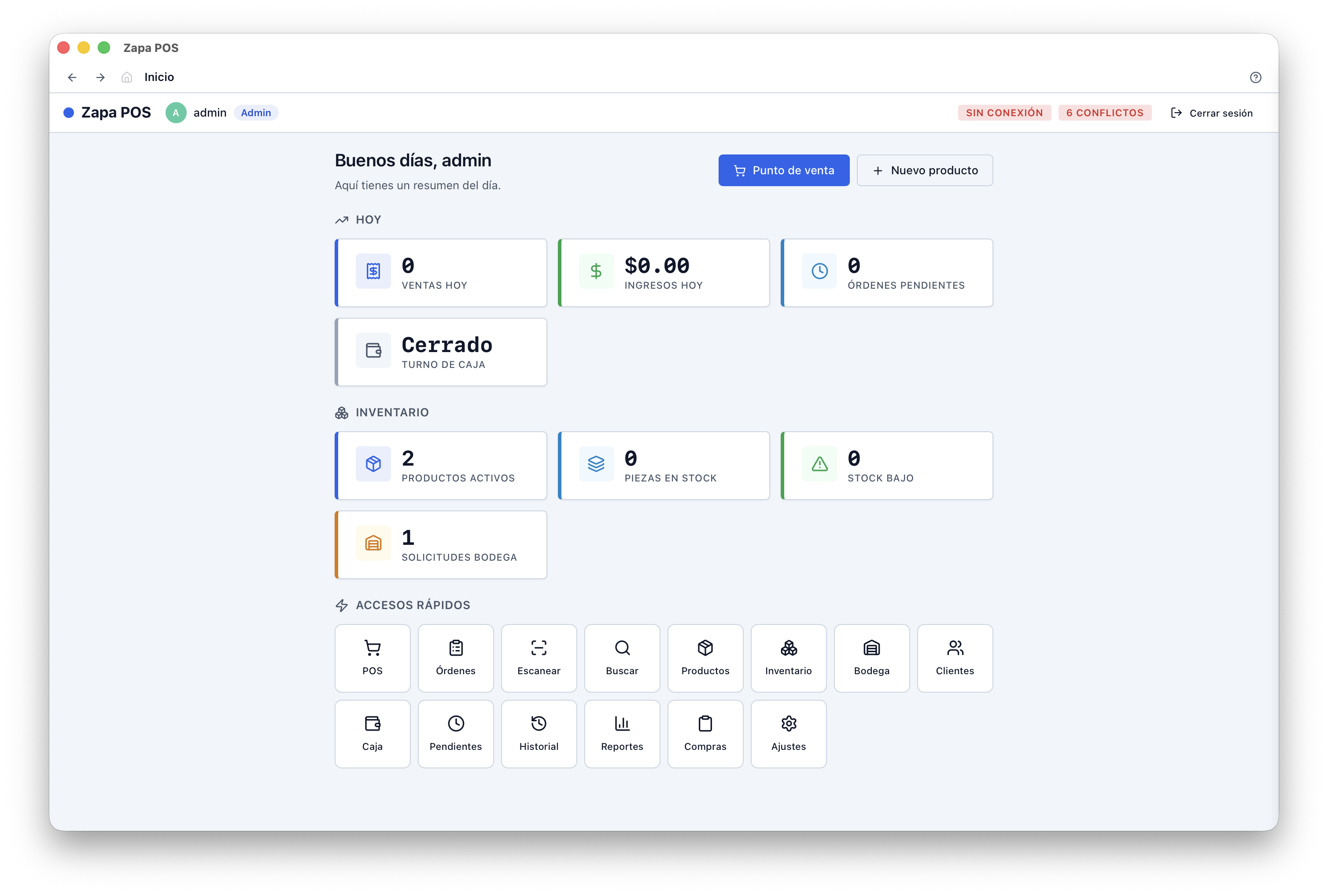
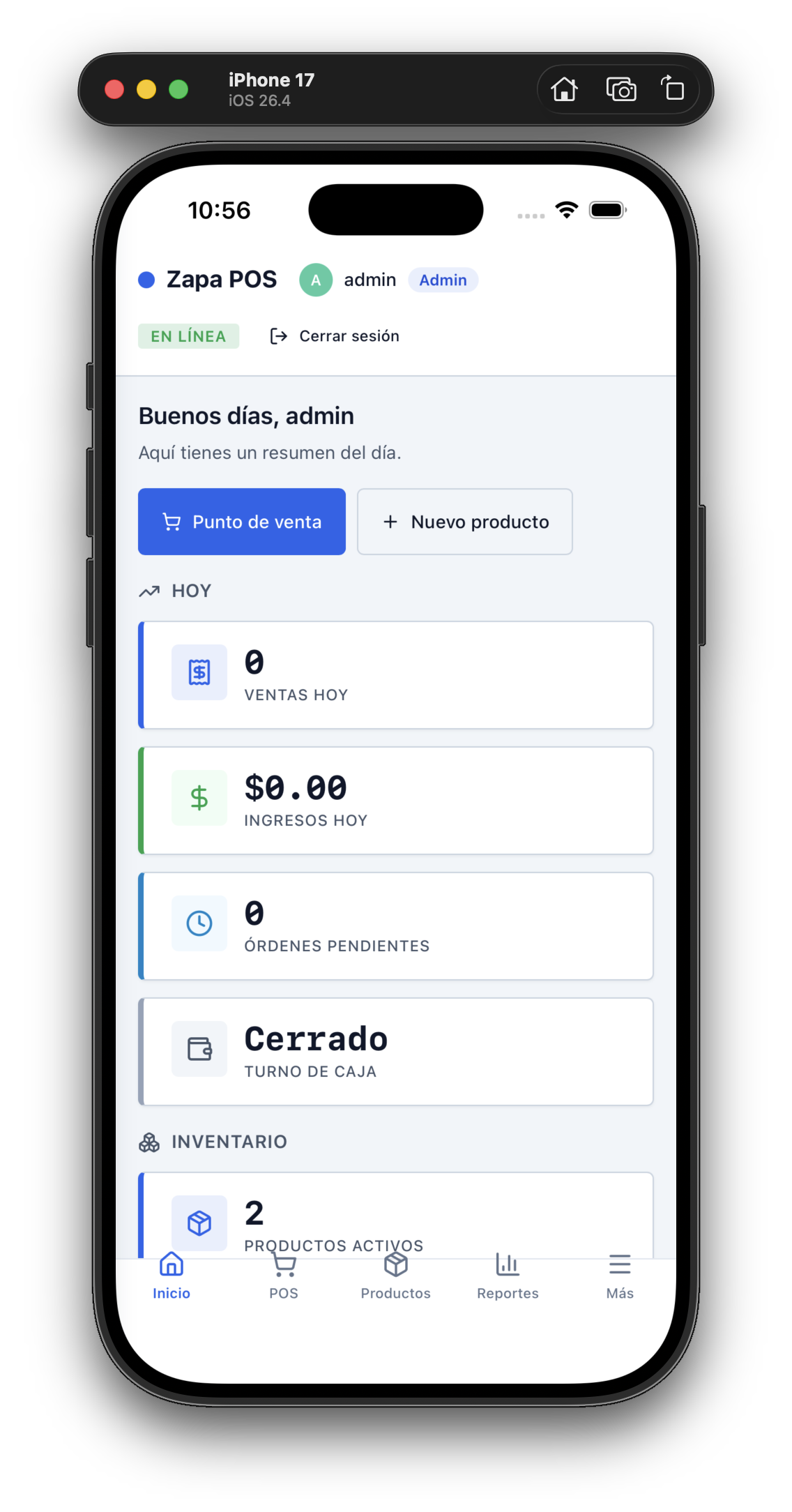
ZapaPOS second iteration
Meteor in the sky
After the second iteration, I had a talk with the customer to discuss how viable this multiplatform approach would be useful for the business. We checked a normal workflow starting from warehouse orders, processing sale tickets and returns, which worked out pretty well with some minor sync issues (a little bit of latency when processing which diminished the ‘real-time’ feat). I have to mention that along this design process I had full ownership of the design decisions, and that it happened in the meantime of 3 weeks approximately, and thanks to the LLMs and AI agents, I was able to iterate and test in a fast manner. During this phase, I was again looking for another framework that would fulfill my desires of a well-rounded full-stack experience, even if it meant that I wouldn’t ship it as a multiplatform using Tauri.
The search was over. I spotted a “Meteor.js” on the horizon. After a long time researching and iterating, the holy grail for app development was found. At least for this specific POS. Why does Meteor work better than the other two proposals?
Meteor has a one-to-one integration with MongoDB, which takes advantage of Mongo’s real-time data synchronization, so it triggers silent updates to the UI and gives a fully reactive experience for the user. Another killer feature of Meteor is how the frontend communicates with the backend via RPC, which I have found to be critical for a real-time app like ZapaPOS.
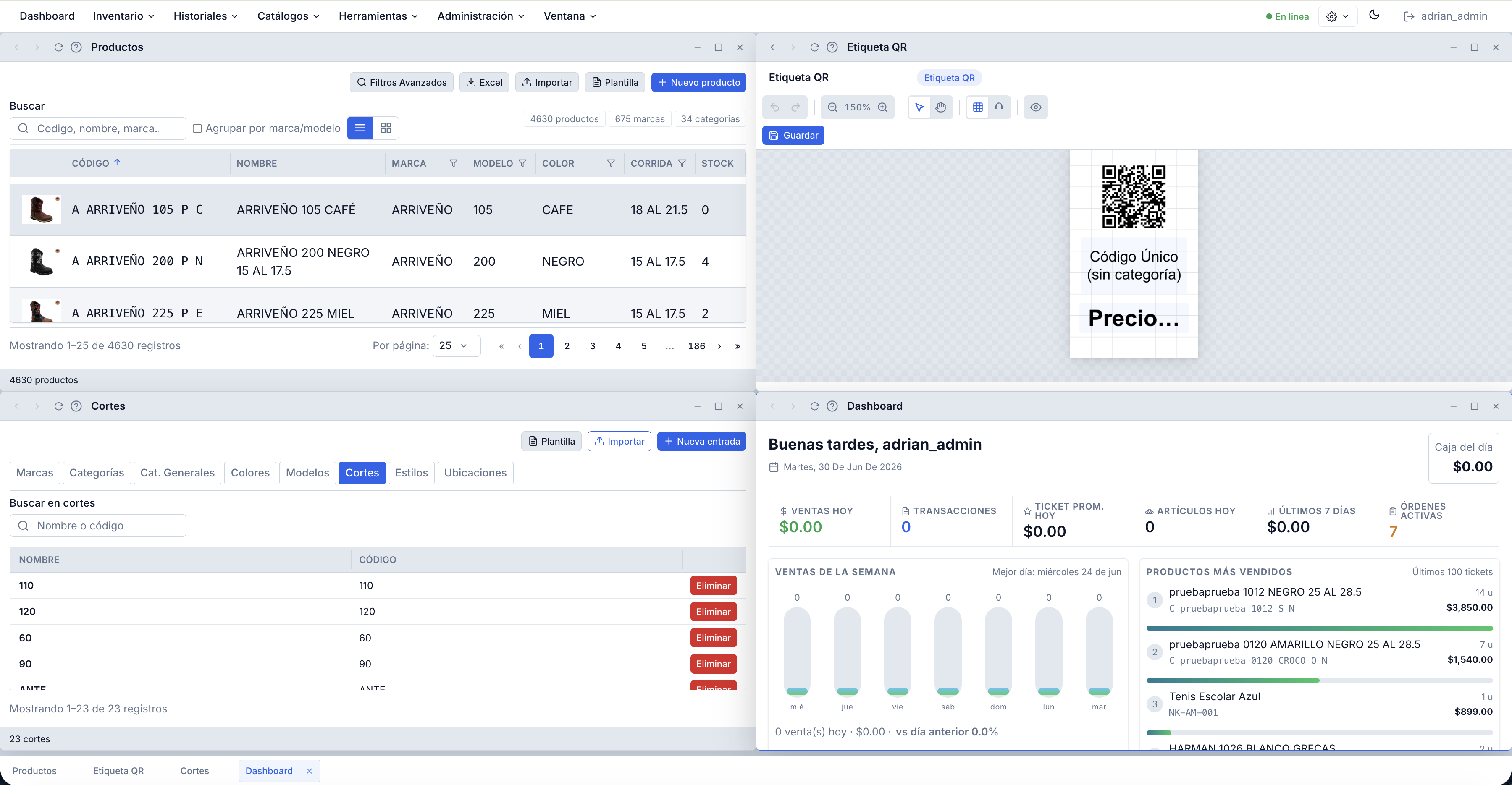
ZapaPOS III: The Final Product
That’s it for Part I of this series regarding ZapaPOS. In the next part, we will see the main technical challenges of this web platform and how they were solved (or kicked under the rug… just kidding…).
Thanks for reading! :D